Connected safety for industrial plants
A watch on every wrist and the map of your plant in front of your safety team. If someone falls, goes somewhere they shouldn’t or you have to evacuate, you know: where they are, how they’re doing and how to reach them. And they know too: their watch warns them and shows them the way out.
It also runs on the company phone your people already carry, with no hardware to buy.

position every 3 s in an emergencyautomatic SOS after 20 s7 configurable rules
When you have to evacuate, every watch knows where to go.
The evacuation is declared from the control room, site-wide or by zone. At that moment every watch vibrates and shows the heading to the muster point assigned to it: an arrow, the metres left and an alert on arrival.
The assigned point isn’t always the same. The type of emergency decides it: with a gas leak, the one downwind isn’t available; with a tsunami, the usual one may be in a flood zone. The routes for each scenario are drawn the day the zones are drawn, not the day it happens.
During the evacuation every watch sends its position every three seconds. And a drill is launched the same way, and logged as a drill.
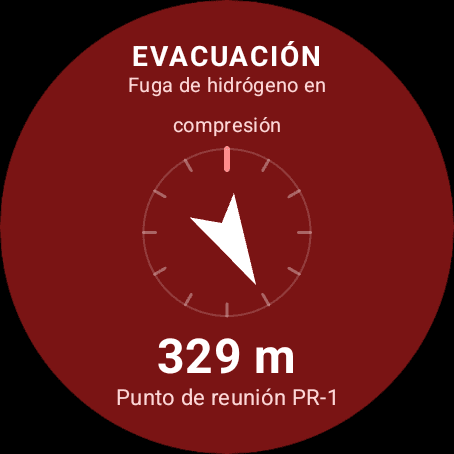
ON THE WRIST
The reason, the arrow and the metres to PR-1. It turns with the arm, so nobody has to remember which of the two points was theirs.
IN THE CONTROL ROOM
Leak at compression: PR-2 is downwind and the map crosses it out. Each arrow is the heading that watch is taking towards PR-1.
And today the headcount is done on paper.
They’ve reached the muster point. A list at the gate and someone calling out names. It takes twenty minutes to find out someone is missing, twenty minutes in which nobody knows where they were.

With SafeOnuba, the headcount is already done.
Every watch sends its position and the server checks it against the muster point’s geofence. Nobody clocks in, nobody calls out names, the counter goes up as people arrive.
And with the watch on the wrist, the day the siren sounds three more things change.
You know who is missing, and where they were
Anyone who doesn’t arrive appears with their name, contractor and last known position. Nobody has to notice they’re missing, it’s already on the screen.
You know whether they respond
If the watch detects a fall, it asks. If there’s no answer within twenty seconds, it sends the SOS on its own. Not answering is, in itself, information.
You send someone with an address
With the alert open, the response team sees their coordinates and, while it lasts, their vital signs. They set off for a specific place, knowing how the person is.
You see your own vital signs on your watch, always. The company doesn’t: outside an emergency the watch evaluates the rules on board and only sends the alert. They are unlocked when an alert opens, visible while it lasts, and a log records who has looked at them.
Permits to work · JSA
The paperwork expires at three. The crew is still inside.
An access control checks the permit on the way in. But if the job safety analysis (JSA) expires with the crew inside, nobody passes through the gate again.
SafeOnuba checks the permits every minute. When one expires — or someone closes it early — it warns whoever is still in the zone and opens the alert in the control room.
ODIEL ENERGÍA · FICTITIOUS PLANT
PERMITS
JOB SAFETY ANALYSIS
PT-0904
- WORK
- Valve inspection on the compression unit
- ZONE
- Compression unit
- CONTRACTOR
- Maintenance contractor
- START
- 08:00
- MANDATORY END
- 15:00
CREW · 4 PEOPLE
- J. Márquez
- A. Romero
- L. Vázquez
- M. Pereira
MAP · LIVE
Approval: a name written on the record
OPEN THE NEXT →
At 15:00 the paperwork closes. The alert goes out both ways.
It doesn’t say someone has entered. It says what has happened: the permit has expired while someone was inside.
ON THE WRIST
The watch vibrates with the reason and the zone. Whoever is still inside doesn’t have to wait for someone to find them by radio.
ODIEL ENERGÍA · FICTITIOUS PLANT
15:00
Permit expired while inside
J. Márquez is still in the compression unit.
PT-0904 · end 15:00 · alert sent to the watch
ZONE STATUS
NO PERMIT
IN THE CONTROL ROOM
The alert carries a name, a zone and the permit. Whoever is in the control room knows there was no entry: the paperwork of someone already inside has expired.

The alert arrives before heatstroke.
The worker gets the instruction to stop: shade and water. And it’s logged that they received it.
Your vital signs are yours.
The worker sees them on their wrist, always. The company doesn’t: in normal operation the watch evaluates the health rules on the device itself and only sends the alert, so the vital signs never leave the wrist.
Only when there is an active emergency, an SOS or a fall, does the response team see that person’s vital signs, for as long as the alert lasts, for that person only, with every access to that data logged. When it is resolved, transmission stops and they are hidden again.
Wrist sensors are there to alert, not to diagnose.
The road through your plant has no pavement
A forklift reversing, a truck on a narrow road, a telehandler at shift change. The driver can’t see behind and the person on foot is looking at their work.
The mirror, the beacon and the hi-vis vest have been doing what they can for fifty years, and all three depend on someone looking at the right moment.
Anyone getting into a vehicle declares it from their watch with one tap, and says which one. From then on, the wrist of anyone on foot ahead of it vibrates when that vehicle enters the radius you’ve set for that type.
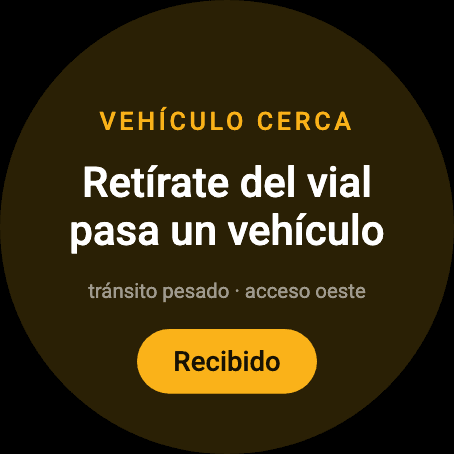
What reaches the wrist isn’t just a beep: it’s what to do and why. And it confirms that it was received.
An SOS button, and if you can’t press it the alert sends itself


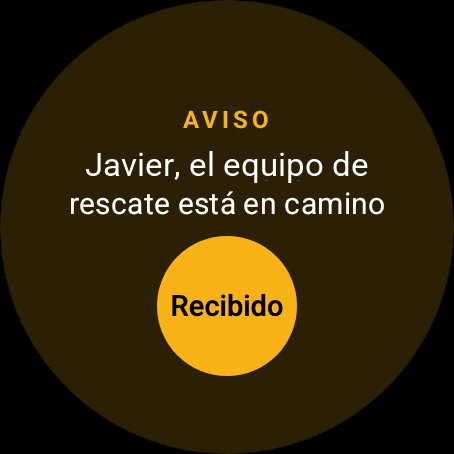
You choose the device to suit the plant. The system is the same.
Map, zones, alerts, evacuation and headcount are the same on the dashboard, whatever each person carries.
|  | ||
| WatchAvailable | PhoneAvailable | BadgeIn development | |
|---|---|---|---|
| Who it’s for | Does it all: the sensors are on the wrist. | Plants where every operator already carries a company phone, ATEX-certified ones included. | Plants on a tight budget: where everyone is, and the headcount. |
| SOS | YesButton, and sent automatically after a fall with no response | YesHold for 3 s, with “Cancel alert” | YesButton, with an audible alarm |
| Position on the map | YesYes | YesYes | YesGPS outdoors; inside buildings, wifi and Bluetooth beacons |
| Automatic headcount at the muster point | YesYes | YesYes, plus “I’ve arrived” | YesYes |
| Evacuation alert | YesVibrates and shows the reason | YesWith the hazard and the wind on the plan | YesVibrates and beeps |
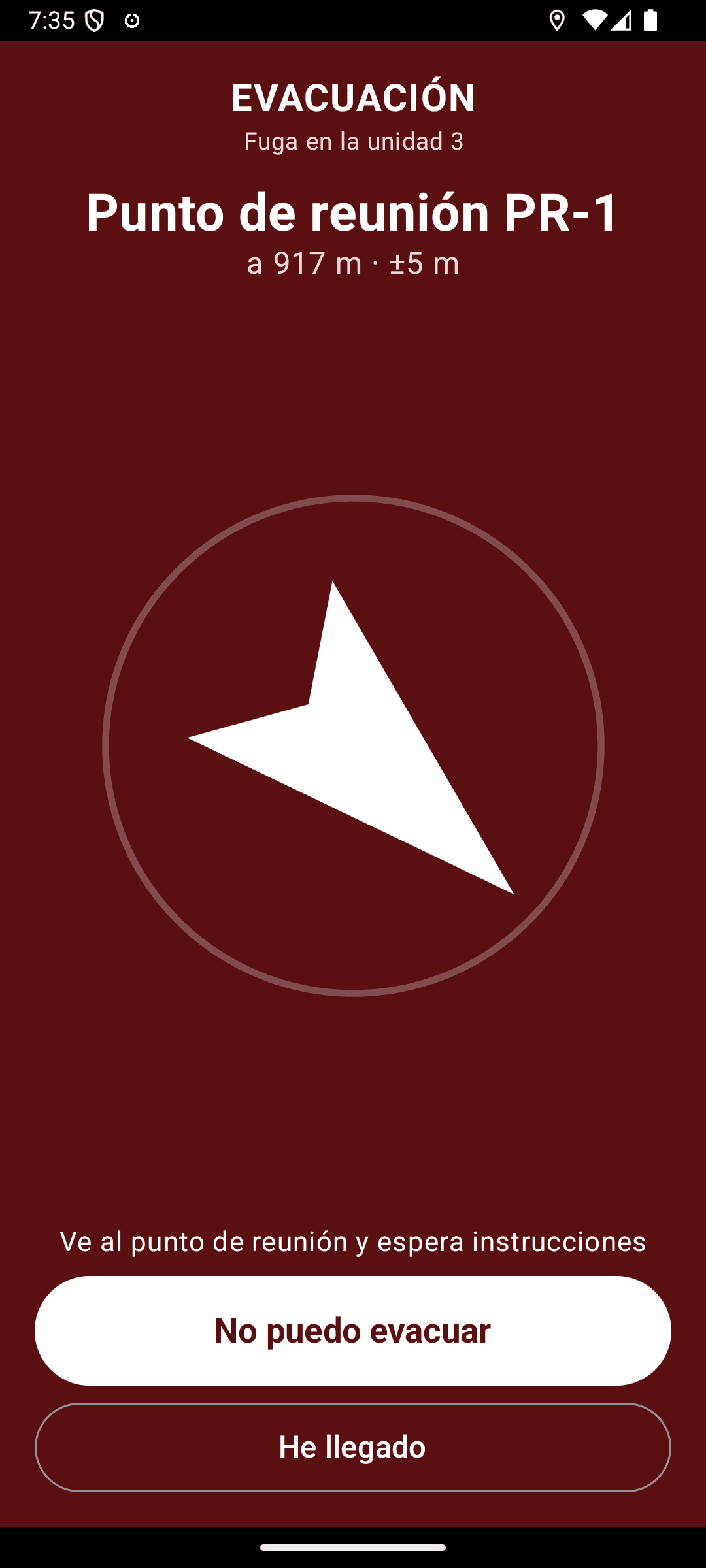
| Evacuation route on screen | YesBearing and metres to the muster point | YesPlant plan, route along the roads and compass | NoNo: it has no screen |
| Restricted or off-limits zone alert | YesYes | YesYes, with the way out on the plan | Not plannedNot planned |
| Vehicle nearby alert | YesYes | YesYes, with the map and where it’s coming from | Not plannedNot planned |
| Voice with the control room | YesYes | YesYes, “Call the control room” | NoNo |
| Tells you when the control room can see your position | YesStatus ring in blue | YesNotice at the top of the screen | NoNo: it has no screen |
| Fall detection | YesYes | NoNo | NoNo |
| Heat stress | YesYes | NoNo | NoNo |
| Heart rate, only during an emergency | YesYes | NoNo | NoNo |
“Not planned”: not among what is specified for the badge today.
Watch and phone: real screenshots of the app, during an evacuation. Badge: an illustration; there are no photos of the device yet.
The phone
No new hardware needed. It’s an app installed from your company’s mobile device management (MDM), and it also works on phones without Google Play. What it doesn’t do is what depends on the wrist: falls, heat and heart rate belong to the watch.
The badge
It’s in development, and it comes from what safety teams ask us for most: the essentials of an evacuation. It’s worn on a lanyard or on the belt, reports its position, counts itself in at the headcount, has an SOS button, and vibrates and beeps when it’s time to get out. What it can’t do is show the way: it has no screen.
You decide what counts as an alert, and when it doesn’t
Seven rules you edit from settings: what fires, at what severity, who it warns and how long it stays quiet afterwards. Changing one doesn’t mean collecting a single watch, and the day the hardware changes the rules stay in place.
REPORTS FACTS
Watch, phone or badge
- “I’m here”
- “I’ve fallen”
- “I’ve pressed SOS”
DECIDES
Rules engine
- what counts as an alert
- how severe it is
- when to stay quiet
RECEIVES
Control room
- live map
- prioritised alerts
- evacuation and report
Devices only report facts. There is no way to bypass the engine by writing through another route.
One of the seven, opened up
- WHEN
- impact detected and no response within 20 s
- SEVERITY
- critical
- NOTIFIES
- control room and the contractor’s supervisor
- REPEATS
- does not fire again while the alert stays open
All four fields are changed from settings, without touching a single watch.
Seven configurable rules
- SOS
- Fall
- Off-limits zone
- Heat stress
- Vehicle near a pedestrian
- Low battery
- Watch offline
Detecting it is half. The other half is being able to say what was done
The engine decides that something is an alert. What comes after is done by your people, and today it ends up in a WhatsApp group, in the memory of two people and in a report written the next day.
SafeOnuba timestamps it on its own. What time it was detected, when someone acknowledged it, who took charge, who was called, when the team set off and when it was closed. Nobody has to remember anything, because the system that detected the alert is the only one that can timestamp everything without depending on someone writing it down.
And it keeps what the decision was based on. Every alert carries the raw event that triggered it and the rule that turned it into an alert, with the thresholds set that day. If someone asks why it fired, the answer isn’t a reconstruction.
No more explaining. Try it.
The mock-up is the control room, simulated in your browser. You trigger the fall, the truck approaching someone on foot, the entry into a restricted zone, the heatstroke alert and the two evacuations.
And you see both ends at once, which is what can’t be told in writing: what appears in the control room and what happens on the wrist of the person inside.
6 scenarios · no sign-up · opens in your browser
If nothing is happening, nobody sees where you are
A watch that knows where you are is a control tool until proven otherwise. It’s the first objection that comes up, it comes from the committee, and it comes with good reason.
That’s why how much the dashboard sees is a level each plant configures. At the strictest, “emergencies only”, it sees no one: the engine keeps watching all the same, and anyone with an open alert appears on the map while it lasts. Seeing someone when nothing is happening has to be requested with a reason and for a set time, another person approves it, and it’s logged.
And the person being seen is told by their watch, with the status ring in blue. There’s no way to see you without you knowing.
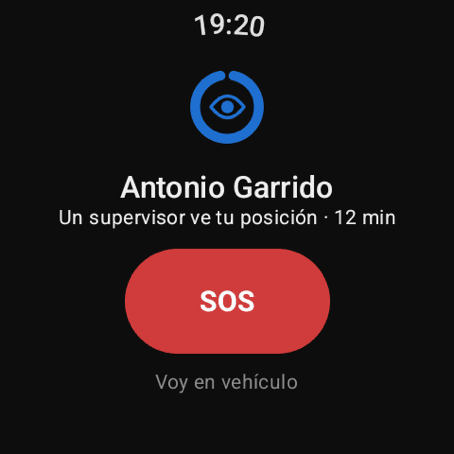
The same ring that turns green, amber or red, in blue and with an eye. The one thing on this page that isn’t a company promise: the worker sees it on their wrist.
What about ATEX zones?
With the watch, SafeOnuba is deployed where there is no explosive atmosphere: construction and assembly, workshops, warehouses, roads, outdoors. On a plant under construction that is practically the whole site, and it starts with standard Android watches.
In classified areas the route already exists, and it’s the phone. The app runs on ATEX-certified Android phones, the ones many plants already hand out, and it’s installed from the company’s mobile device management. The ATEX-certified watch is in development. The hardware changes, not the software.
And what you pilot now isn’t thrown away: same rules, same map, same control room, same history. Today’s pilot is the foundation of tomorrow’s deployment.
Pilot SafeOnuba at your plant.
Tell us what your plant is like and we’ll prepare a demo with your real zones on the map. No commitment.